Posts

Showing posts with the label Technical

Hardware OTP Tokens

Swami Gulagulaananda said: " Security by obscurity is an interesting notion - for we all fear what we don't understand " A long time ago, I saw a friend of mine holding a small hand-held device. It hand a single button and a small screen. I asked him what it was. " Oh, I have an account with HSBC Bank. This is an OTP generator, it is for additional security ", he replied. " How does it work? ", I asked him. " I don't know man, they ask me to enter it while signing in. I press the button, some number comes up and I enter it ", he replied I tried it. Each time I pressed the button, a seemingly random number appeared on the screen. However, once a number appeared, it didn't change and remained on the screen. It didn't change even if I pressed it. It would remain for some time, perhaps a minute and then disappear. I pressed the button again and another number would appear. This was pretty interesting. But I soon forgot about i...

Knight's Tour

Swami Gulagulaananda said: " The dark knight can never be blocked... nor can the white knight " The Knight's Tour is a mathematical puzzle which I had played on a Windows Phone game called Doors. I didn't know it was called Knight's Tour till I watched this Numberphile video . I had some time to spare and wrote a simple version of it that you can test out below. The objective of the game is to make sure that every square of the board has been occupied by your knight once. Click on any valid square to make your move Programmers: Do you think you can write a program to find solutions? Knight's Tour Move the knight and cover every single square without repeating a square ♞ Restart 5x5 Board Restart 8x8 Board

Playing old DOS games

Image
Swami Gulagulaananda said: " Only 90's kids will understand this " Remember the good old days of Dangerous Dave, Doom and Commander Keen? I remember spending countless hours playing all those games - Jazz Jackrabbit, Cosmo's cosmic adventures, Hocus Pocus, Prince of Persia... the list is endless. I recently stumbled upon a great way to play those old DOS based games on your modern computer. I thought of sharing it with you guys. Install DosBox The first step is to download and install DosBox, a DOS emulator. Download DosBox Download Games The next step is to download games. There is a wonderful site that hosts all these old games. You can search and download the games of your choice from here. Download Games Make games available on DosBox After you download games, unzip the files Create a dedicated folder to put all your downloaded games. Like, C:\dos_games or ~/dos_games . Now, run DosBox. You should see the terminal. Run the command below: moun...

The Javascript Closure Problem

Swami Gulagulaananda said: " Closure is very important in broken relationships... Also in JavaScript " I was trying to write a fairly simple piece of code where I would create an array of functions in JavaScript. There was a loop and a function would be generated in each iteration such that the body of the function had a dependency on the loop counter. What happened finally was that every function in the loop was the same as the last function. I was bewildered. I understood that it was because of some reference issue but could not come up with a solution easily. Here is a simple piece of code: I was expecting a[0]() to give 0, a[1]() to give 1 and so on. But I was getting 3 each time. How do you solve this? After breaking my head for some time (despite knowing it was something to do with Closures) I posted the question on Stackoverflow. Try solving this problem by yourself before seeing the solution. Here's the solution:

Monkey-Wrench: Ultimate Customisation Extension

Image
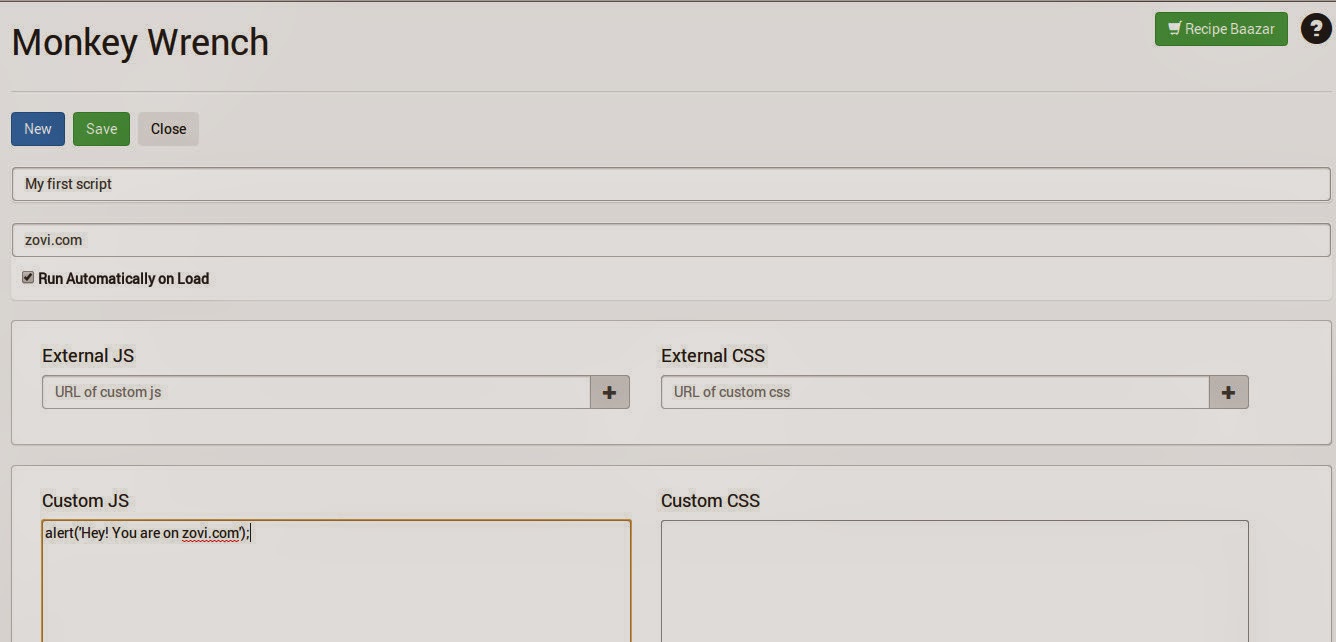
Swami Nikhilaananda said: " The simplest of changes become extremely difficult without the right tools " Monkey-Wrench is a Chrome extension that I built along with Mayur Kataria and Parin Kataria. The extension allows you to use custom CSS and run custom JavaScript on any website Overview There have been numerous instances when we are unhappy with the way some of our favourite sites look like. For instance, Twitter's UI became an eye-sore recently. You might be a good designer or might know a good designer and may want to apply your own styling to make the site look more appealing. How do you go about doing that? Simple! Just install Monkey-Wrench extension from here . Right click on the extension icon and click on Options. This takes you to the Projects page. Click on New Project, and provide your style and scripts. Click on Run Automatically. That's it! Non Developers Non-Developers can also make use of Monkey-Wrench by using our Recipe Bazaar - A re...

Writing games in JavaScript

Image
Swami Nikhilaananda said: " All work and no play makes Gulagulaananda a dull old man... well duller " With every passing day, I am beginning to like JavaScript more and more. JavaScript is very easy to learn and with one language, you can write front-end applications, back-end scripts, run servers and even write mobile apps for Android, iOS, Tizen etc. I think that's incredible! I have written a couple of simple games with JavaScript and thought I should write a post about one of them. So, let's have a look at a simple game I wrote, called Crates . The objective of the game is simple. There is a "hero", a character you control with the keyboard arrows. There are some crates and some targets (golden balls). The goal is to cover all targets with the crates. The hero can push a single crate but never pull one. Only one crate can be pushed at a time. A crate that is against the wall or another crate cannot be pushed. So it gets tricky when you push cra...

Of Random Seeds and Other Random Bits

Baba Gyani Triviani said: " If you believe in fate and destiny, then the randomness in this world is pseudo-randomness " Random Number Seed I am sure most of you would have used a Random number generating piece of code in your program at some point of  time or another. And when you were looking up code, you would have noticed the word 'seed' but would have ignored it. Some of you would have even noticed a word called pseudo-random number generator. Well, I did. And I didn't know what this seed was until a few days back. Let's try out an experiment. I will use Python in this post, but you can use any other language - Java, Ruby and they will all behave in the exact same way. >>> import random >>> random.random() 0.23108685984562283 >>> random.random() 0.017276293409835386 If you try this piece of code on your machine, your results will be different from mine. Isn't that obvious? It IS a random number generator af...

Jailbreak old iPod - Convert to hand held computer

Image
Swami Nikhilaananda said: " An Apple a day will definitely make me bankrupt " [The purpose of this post is not to tell you how to get themes, mod or dropdown menus] I have an old iPod - 2nd Generation 8 GB one lying around. With the rapid rate at which technology becomes obsolete, I often wonder if investing money into buying gadgets really makes sense. Apple promptly stopped support for the older generations of devices, with no software updates beyond 4.2.1 and none of the newer apps work on my device either. Which means, I have to be happy with whatever apps I had installed. It suddenly went from a savvy gadget to ordinary music player - something that phones do as well. I also have a Raspberry Pi and I thought - it would be really cool if I can somehow make my iPod a screen for the Raspberry Pi - Act as a monitor. That'll give me a small computer of sorts. My first thought was to run a VNC server on the Pi and a VNC player on the iPod because I was looking for ...

Golem - A Flying Robot - Idea for a project

Baba Gyani Triviani said: " Look up in the sky, it's a bird, it's a plane... No, it's Golem! " Project Golem (Note: Golem is a mechanical robot in 'Batman of the future' which is controlled by a guy remotely such that movements of his hands translates to corresponding movements of the robot, much like the movie 'Real Steel') I had been to Ayana, a hackathon in PESIT recently and saw quite a few hardware hacks. With the arrival of Arduino into the market, robots seem to have become quite ubiquitous, which is a good sign. Students, most of the time, design and build single purpose robots, that could be a line following one or a maze solving one. Rarely are they developed as systems. The Raspberry Pi is an interesting device - The size of a credit card, it comes with 2 USB ports, an ethernet port, a power in port, an HDMI port, a video out and a sound out along with an SD card slot. The cost is supposed to be around $25. The advantage of a Ra...

Measuring your dimensions with your webcam

Image
Swami Gulagulaananda said: " When you try to write a program that does what a human can do, you will appreciate the greatness of nature " Microsoft's XBox Kinect is a wonderful device and an optional add-on to the XBox gaming console. The device allows you to play games without using any hand-held controllers. For example, if you were playing Fruit Ninja, you can slice fruits just by making a slicing action with your hand - Woop! The fruit on the screen gets sliced. There are many beautiful games that you can play with the device. But from a technical standpoint, it is interesting how the Kinect actually determines your position. The Kinect has 3 sensors - One is a camera, one is an Infra Red sensor and one more I think is used to get wireframe images. In fact, there are special chips within the device that allows for motion and gesture recognition, 3D rendering etc. Read more on Wikipedia here . Now let's have a quick look at the problem statement - It's...

Android: Setting up ViewPagerIndicator

Image
Swami Gulagulaananda quoted: " Everything is difficult before it's easy " In Android applications, many times, you have a bunch of things that you want to show - that are shown one at a time, and you can slide your finger horizontally across for the existing pane to fly off and the new pane to fly in. To do this, you make use of Android's ViewPagers. However, in order to let a user know that the sliding is possible and also to indicate how many such slides are available, there are some symbols that you might have noticed. Like hollow circles and a filled circle, for example. To achieve this kind of effect, everyone over the Internet seems to suggest using a library called ViewPagerIndicator . And they are right. You can quickly set it up. But if you are a novice, you will go through one hell of a time trying to set it up. You can get a host of issues that you might not know how to resolve. I found that there are a large number of people in various forums,...

The Monty Hall problem

Swami Gulagulaananda said: " You showed me a goat and made me a bakra " There was an interesting discussion at office today. I'd heard about this problem before, but didn't know that the name of the problem is " Monty Hall " problem. The problem goes like this: Suppose you're on a game show, and you're given the choice of three doors: Behind one door is a car; behind the others, goats. You pick a door, say No. 1, and the host, who knows what's behind the doors, opens another door, say No. 3, which has a goat. He then says to you, "Do you want to pick door No. 2?" Is it to your advantage to switch your choice? [ Source: Wikipedia ] If you have not heard of this problem, take some time and think about it. See what the solution is, according to you. Then continue reading... You will encounter views and counter-views. Spoiler Alert: If you continue reading beyond this part, you will encounter answers Apparently the co...

Create your own Chat system

Swami Nikhilaananda said: "Chat is cool, chaat is cooler" If you have used Pidgin, you would have seen the word XMPP. It will be really great if you have a look at this beautifully written article by Adarsh Ramamurthy on XMPP . In this post, we attempt to communicate between two computers via chat - And no, not using Google or Yahoo :-) I am using Linux on both machines. You can do the same thing with Windows. Step 1 , is to download the XMPP server. Let's call the machines as A and B. I stumbled upon ejabberd long back, and so used that. There are alternatives as well. On machine A, download and install ejabberd . I simply ran: sudo apt-get install ejabberd If everything went well, you will have it up and running, no sweat. Now, in step 2 , we will create two accounts. To do that, we will register them using the following commands. Oh, I am going to use Romeo and Juliet just for continuity from Adarsh's article. sudo ejabberdctl register romeo loca...

Kinect, Python and first few lines of code

Baba Gyani Triviani remembered: " Example is always better than precept " Many times, we are interested to do something but we don't find  the right resources. Some times, we find resources badly presented or presented at a very high level and when we beginners try to skim through the material, we are reminded of the feelings we had while skimming through Engineering text books, fondly remembered by EC students as "Over head transmission". I intend to keep this post short at this moment, for my knowledge in the subject is very very limited. However, as I pick on more stuff, I will perhaps update this post with more stuff or provide links to newer posts. In this post, I would like to show two simple programs to capture a normal photograph as well as to capture an IR photograph and show it on screen using Kinect, Python and OpenCV. If you don't know how to get up and running with Kinect, refer to my previous post here . The program to capture normal ...

Programming with Kinect - Up and running

Swami Gulagulaananda said: " If you a lot of potential, convert it to Kinectic " After recently messing around with OpenCV and Python , I thought the next thing to mess around should be Kinect. Today I played around a tad bit, but was happy that the stuff I was trying out worked fine. So if you are interested to play around with Kinect and don't know how to proceed, read on... First of all, Kinect as most of you would already be knowing is a Microsoft product. So, programming it with MS Visual Studio (C# and VB) is probably way easier... I haven't tried that out yet since I don't have a good machine with Windows at the moment. So this post mainly is how to install it on Linux and see an output to show that "My kinect is up and running". The language is Python. Do you have a Kinect (with power supply)? You first need to have a Kinect. If you don't own an XBox with Kinect, you should buy one :-) It's awesome for playing games. But instea...

Open CV Python Face Detection making LED Glow via Arduino

Image
Swami Gulagulaananda said: " There was light... I blocked my face and *poof* Off it went! " I had some spare time on me, and I thought " You know what? Let me do something " - I decided to have a look at Open CV and Python. I am just a beginner at this point of time and have done nothing very clever. But if you share my enthusiasm, you will find this little thing pretty nice. In my previous post , you will see how to write a very small program to get Face Detection done. Notice that you don't need to know anything about Image Processing (It is an awesome subject if you are interested in) but you can still get some stuff up and running. After I did that and it worked, I thought, let me take this one step higher. What is the use of Face Detection if you don't do anything after that? So in this post, I show you how to make an LED glow or turn off, depending on whether a face is detected or not. It is not at all as complicated as the title seems. All y...

Face Detection using Open CV and Python

Image
Swami Nikhilaananda said: " Face Detection and other awesome stuff have been greatly simplified with OpenCV and Python " I am no expert in this field, but I was just excited to have a piece of code working. In this little program, we attempt to do a face detection using Python and OpenCV. First get Open CV and Python up and running following simple tutorials found here . The following is a piece of code - Replace the path of the Haar Classfier file (xml) with the one in your system. Save the file, and run the script. As you could have probably guessed, absolutely nothing intelligent is there in the program above. Everything is taken care of by OpenCV. Which is what makes it really good for people who don't know much of Image Processing, nor want to know the mathematical nitty gritties. Perhaps in the next post, you should be able to see how to Glow an LED when a face is detected - by interfacing with Arduino You can see LED Glowing with Face Detection us...

Comment & Uncomment multiple lines in Vim

Baba Gyani Triviani said: " When someone said 'No Comments' I just had to intervene. No comments? Have multi-line comments my friend! " Commenting and uncommenting multiple lines in Vim can be a little tricky. Here is a small snippet of code to show how you can do this. I have done this for just a few of languages. But you can extend this to any number as per your choice. Save the following into a file and call it vcomments.vim Once this is done, open your ~/.vimrc  file if it exists, or create a new one. There, put the following code. :source ~/ vcomments.vim :map <C-a>  :call Comment()  <Enter> :map  <C-b>  :call Uncomment()  <Enter> Where you can replace a and b of and by whatever is convenient to you. This just calls the functions when the Ctrl + <key>  combination is hit. To use it, just select the lines to comment by using Shift + v and moving cursor up or down to select lines. Then, hit the Ct...